- First, you need to register in ApiX-Drive
- Next, select the service in the web interface you need to integrate with Google Drive (currently 335 available connectors)
- Choose what data to transfer from one system to another
- Turn on auto-update
- Now the data will be automatically transferred from one system to another.
Google Drive API
We already have a connector api with service Google Drive! You can connect to our system without wasting time on writing code.
5 minutes after registration, you can start using the available functions without involving programmers. Operation principles see below!

+335
available systems

How it works
Our developers have already figured out how the API for the system Google Drive works and created a new connector. On the same principle, we have created connectors with other online services, we already have more than 200 of them!
Now you do not need to spend time writing program code yourself, you can link 2 or more services through our online interface in a few clicks!
This is how our system works with other systems.
Now you do not need to spend time writing program code yourself, you can link 2 or more services through our online interface in a few clicks!
This is how our system works with other systems.
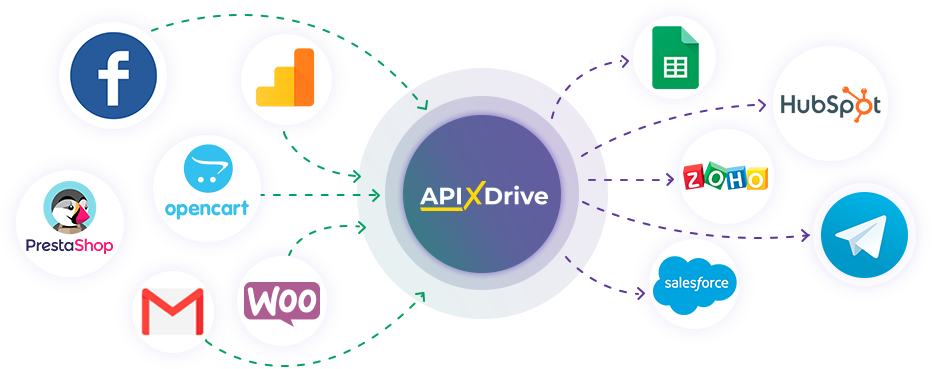
After registration, you will be able to "connect" more than 200 different online services. Without involving programmers and without programming skills! To get started, just register in 1 click!
Without restrictions
Get a 14-day
trial access
trial access
How to integrate Google Drive and other systems
with ApiX Drive by API
Now you don't need to hire programmers or integrators to automate Google Drive with other systems.
With ApiX-Drive you can connect and automate these systems in 5 minutes yourself.
With ApiX-Drive you can connect and automate these systems in 5 minutes yourself.
Select the online systems to be linked
Specify the actions between systems
Turn on auto-update
The setup will not take more than 5 minutes.
Automation capabilities Google Drive
with other systems by API
Configure the rules once, according to which the systems will work.
Exchange data between Google Drive and other systems according to the specified interval
Exchange data between Google Drive and other systems according to the specified interval

Data source: Google Drive, available actions:
- Get FILE (new)
- Get FILE (updated)
- File NOTIFICATION (new)
- File NOTIFICATION (updated)
- Folder NOTIFICATION (new)
- Folder NOTIFICATION (updated)
Data receiver: Google Drive, available actions:
- Copy FILE
- Copy FOLDER
- Create FOLDER
- Delete FILE (to trash)
- Delete FILE (permanent)
- Delete FOLDER (to trash)
- Delete FOLDER (permanent)
- Move FILE
- Move FOLDER
- Rename FILE
- Rename FOLDER
- Upload FILE
F.A.Q. on integration with Google Drive
How is the integration of Google Drive carried out?
How long does the integration take?
Depending on the system you want to integrate, the setup time may vary from 5 to 30 minutes. On average, it takes 10-15 minutes.
How much does it cost to integrate Google Drive with other systems?
You don't need to pay for the integration, as all the functionality is available at all plans. You pay only for the amount of data transferred from one of your systems to another through our service. If you have a small amount of data per month, you can use a free plan and switch to a paid one, if necessary. More information about plans .
How many integrations are available for Google Drive?
At the moment, we have 335 integrations Google Drive with other systems
API information for Google Drive
Google Drive is a cloud storage and collaboration platform. The service allows you to securely store files in the cloud, sync them across devices, and edit them in real time. Users can share content via public or private links, customize access rights (read, comment, edit), and manage permissions for individual users or organizations.
Using the Google Drive API, developers can easily and efficiently integrate third-party applications with Google Drive cloud storage to transfer data, automate routine operations, and create seamless workflows. The powerful API allows you to embed essential Drive functionality directly into your own services, applications, and systems, providing a unified user experience without leaving your platform.
The API toolkit enables full-cycle management of storage objects. Developers can programmatically upload new files to the cloud, as well as perform operations such as renaming, copying, and moving elements. Deleting files and folders or moving them to the Recycle Bin is also supported. The range of available actions ensures flexible management of the data structure and maintaining content up-to-dateness.
You can find detailed information about the Google Drive API and integration setup features in the official developer guide: https://developers.google.com/workspace/drive/api/guides/about-sdk
Don't have time for custom integration? Use our no-code platform to automate file and folder management without programming.
Are you the owner or developer of a service
that we don’t have?
that we don’t have?
Find out on what conditions we can implement the integration
with your service on this page
with your service on this page